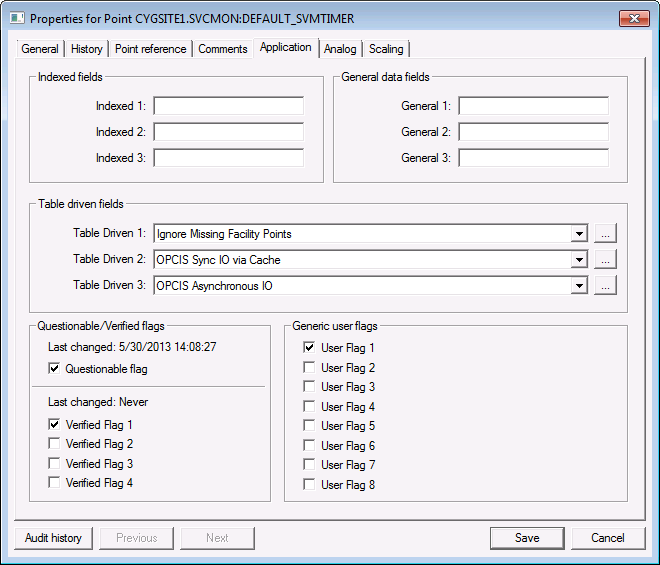
Use the Application page to configure application-specific properties for a particular point. For example, they may be used by Service Monitoring Service points, Facility points, or OPCIS points. If they are not serving an application-specific purpose, they can be used to store extra attributes.
The names of these properties, except the Questionable/Verified Flags, are user-configurable. Be aware that the property names are service-specific. That means that they apply to all records in the service. To change the names of the properties, right-click in the service pane and click Configure Attributes. See Setting Default Point Configuration for information about configuring default attributes and descriptions for the points attributes.
|
|
| Sample Application page for an Existing Point |
These are the properties shown on the Application page in the PNT Editor.
See Token Categories - Point: Application for the corresponding tokens for each property and Filter Attributes - Point: Application for the corresponding filter attributes for each property.
| Property | Description | Default Value |
|---|---|---|
| Indexed fields | ||
|
Indexed 1 |
Property that is included in a defined PNT index. Free-form text up to 15 characters. |
Blank |
|
Indexed 2 |
Blank |
|
|
Indexed 3 |
Blank |
|
| General data fields | ||
|
General 1 |
Free-form text up to 20 characters.
For more information about uses for these properties, see Filtering a Group Rollup and OPCIS Groups. |
Blank |
|
General 2 |
Blank |
|
|
General 3 |
Blank |
|
| Table driven fields | ||
|
Table Driven 1 |
Entry from CMT1 table. Click … to select or configure an entry from the CMT1 table. Default options include: FALSE, OPCBADIGNR, OPCBADSTR, SVMDELTA, SVMRATE_D, SVMRATE_H, SVMRATE_M, SVMRATE_MS, SVMRATE_S, SVMSCALED, TRUE. See OPCIS Groups for more information. |
Blank |
|
Table Driven 2 |
Entry from CMT2 table. Click … to select or configure an entry from the CMT2 table. Default options include: OPCSYNCCCH, OPCSYNCDEV. See OPCIS Groups for more information. |
Blank |
|
Table Driven 3 |
Entry from CMT3 table. Click … to select or configure an entry from the CMT3 table. Default options include: OPCIOASYNC, OPCIOSYNC. See OPCIS Groups for more information. |
Blank |
| Questionable/Verified Flags
See also the QUESTION security event for more information. |
||
|
Last changed |
Indicates when the questionable flag was last changed. |
Never |
|
Questionable flag |
Indicates data is questionable. |
0 (No) |
|
Last changed |
Indicates when the verified flag was last changed. |
Never |
|
Any Verified Flag |
An internal flag that indicates that at least one Verified Flag in the point record has been set. |
0 (No) |
|
Verified Flag 1 Verified Flag 2 Verified Flag 3 Verified Flag 4 |
Attribute property. Option is 1 (Yes) or 0 (No). |
0 (No) |
|
Any User Flag |
An internal flag that indicates that at least one User Flag in the point record has been set. |
0 (No) |
| Generic User Flags | ||
|
User Flag 1 User Flag 2 User Flag 3 User Flag 4 User Flag 5 User Flag 6 User Flag 7 User Flag 8 |
Attribute property. Option is 1 (Yes) or 0 (No). |
0 (No) |

|
|
|

